
Formdata : How to send images to Server and use them?
Way of Handling Media in JavaScript

Introduction to FormData
Handling media files efficiently is critical for building scalable web applications. Unlike Base64, which encodes binary data into text, FormData allows direct transmission of files as binary data, making it ideal for handling large media files like images, videos, and audio.

Frequently “Un” Asked Questions
What is FormData and Its Purpose?
FormData is a built-in JavaScript object that allows you to construct key/value pairs representing form fields and their values, including file inputs. It simplifies the process of uploading files to the server without converting them into another format.
Does FormData Compress Data or Increase Size?
FormData sends files in their original binary form, resulting in no size increase. This makes it far more efficient than Base64, especially for large files.
Where Is FormData Used?
FormData is widely used for:
Uploading files via web forms.
Handling file uploads in single-page applications (SPAs).
APIs that support multipart form data.
Sending Media to Server with FormData
FormData handles media uploads more efficiently than Base64 by transferring raw binary data.
Frontend Example:
const fileInput = document.querySelector('input[type="file"]');

fileInput.addEventListener('change', async () => {
    const file = fileInput.files[0];
    const formData = new FormData();
    formData.append('file', file);

    await fetch('/upload', {
        method: 'POST',
        body: formData,
    });
});
Backend Example (Node.js with Multer):
const express = require('express');
const multer = require('multer');
const app = express();

const upload = multer({ dest: 'uploads/' });

app.post('/upload', upload.single('file'), (req, res) => {
    console.log(req.file);
    res.send("File uploaded successfully!");
});

app.listen(3000, () => console.log('Server running on port 3000'));
Behavior of FormData with Different Media Types
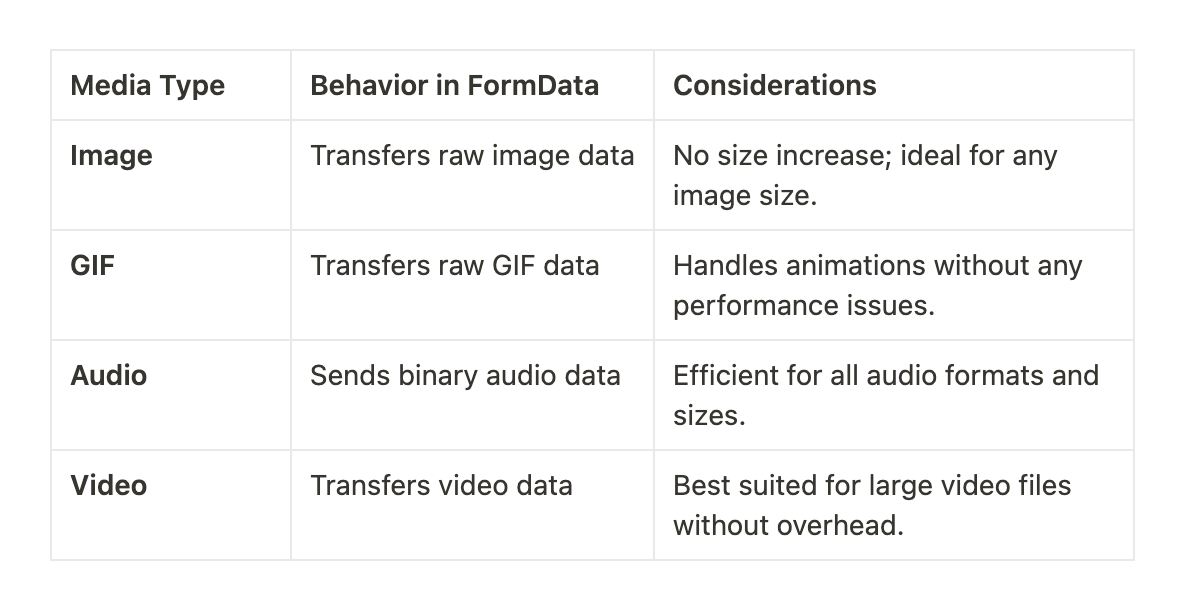
Key Points Across Media Types:
FormDataseamlessly handles all file types in their original formats.No encoding or decoding required.
Ideal for large media files due to efficient transfer.
Advantages of FormData
Efficient for Large Files: No size increase; transfers raw binary data.
Native Browser Support: Works across all modern browsers.
Simplifies Uploads: Automatically sets the correct
Content-Type.
Disadvantages of FormData
No Inline Embedding: Cannot embed media directly in HTML or JSON.
Requires Backend Support: Server must handle multipart form data.
FormData vs Base64 Comparison

When to Use FormData
Uploading Large Files: Videos, high-res images, and audio.
Performance-Critical Applications: When speed and efficiency matter.
APIs Supporting File Uploads: REST APIs or GraphQL with file handling.
When Not to Use FormData
Embedding Small Assets in HTML/JSON: Use Base64 for small, inline media.
When Backend Doesn’t Support Multipart Data: Requires backend setup.
Alternatives to FormData and Base64
Blob and File API: Efficient handling of raw binary data in browsers.
Streaming Uploads (Readable Streams API): Upload large files in chunks to reduce memory usage.
Presigned URLs (Cloud Storage Uploads): Direct upload to cloud storage services (e.g., AWS S3).
GraphQL Uploads: Handle file uploads in GraphQL APIs using
multipart/form-data.
Conclusion
FormData is the go-to method for handling media uploads in modern web applications. It offers superior performance and efficiency compared to Base64, making it ideal for large media files. While Base64 has its place for small, embedded assets, FormData excels in scalability and speed for serious file handling.
Stay Tuned: In future posts, we'll explore advanced media handling techniques and performance optimization strategies.