
How does AI (GPT) use Server Side Events and How it renders images?

What is Server Side Events?
Why AI Tools use it
How AI APIs Structure Their Streams
How Are Canvas/Artifacts Opened?
How Are Images Handled in Streams?
Implementing SSE Consumption in Your Frontend
Debugging SSE Streams : Browser DevTools
Why not Web Sockets?
Conclusion
AI chatbots feel responsive because they stream responses in real-time using Server-Sent Events (SSE). In this post, we’ll break down how AI tools structure their streams, handle images, and trigger UI features like Canvas—with practical code examples you can use today.
What is Server Side Events?
Server-Sent Events (SSE) is a web technology that allows a server to push real-time updates to a browser over a single, long-lived HTTP connection.
Unlike traditional HTTP where the client requests and the server responds once, SSE keeps the connection open so the server can continuously send data whenever it has something new.
Client                    Server
  |                          |
  |  --- HTTP Request --->   |
  |                          |
  |  <-- data: chunk 1 --    |
  |  <-- data: chunk 2 --    |
  |  <-- data: chunk 3 --    |
  |  <-- [DONE] ----------   |
  |                          |
SSE uses a simple text-based protocol with Content-Type: text/event-stream:
event: message
data: {”text”: “Hello”}

data: {”text”: “World”}

event: done
data: {”status”: “complete”}
Each event is separated by a double newline (\n\n).
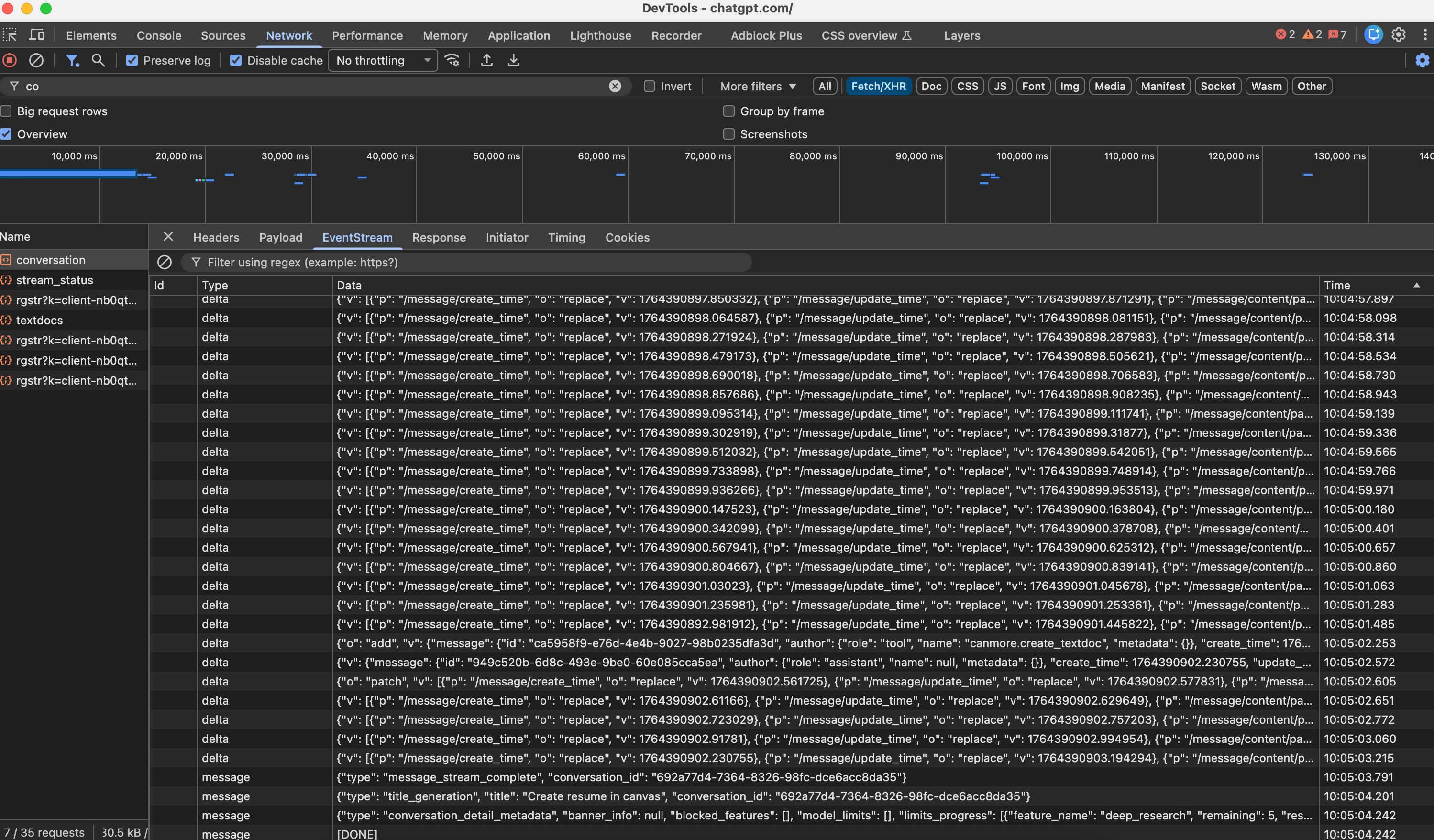
Why AI Tools Use It
LLMs generate text token-by-token. SSE lets them stream each token as it’s generated rather than waiting for the complete response—that’s why you see ChatGPT and Claude “typing” their answers and SSE is simpler than WebSockets when you only need server-to-client communication, which is exactly what streaming AI responses requires.
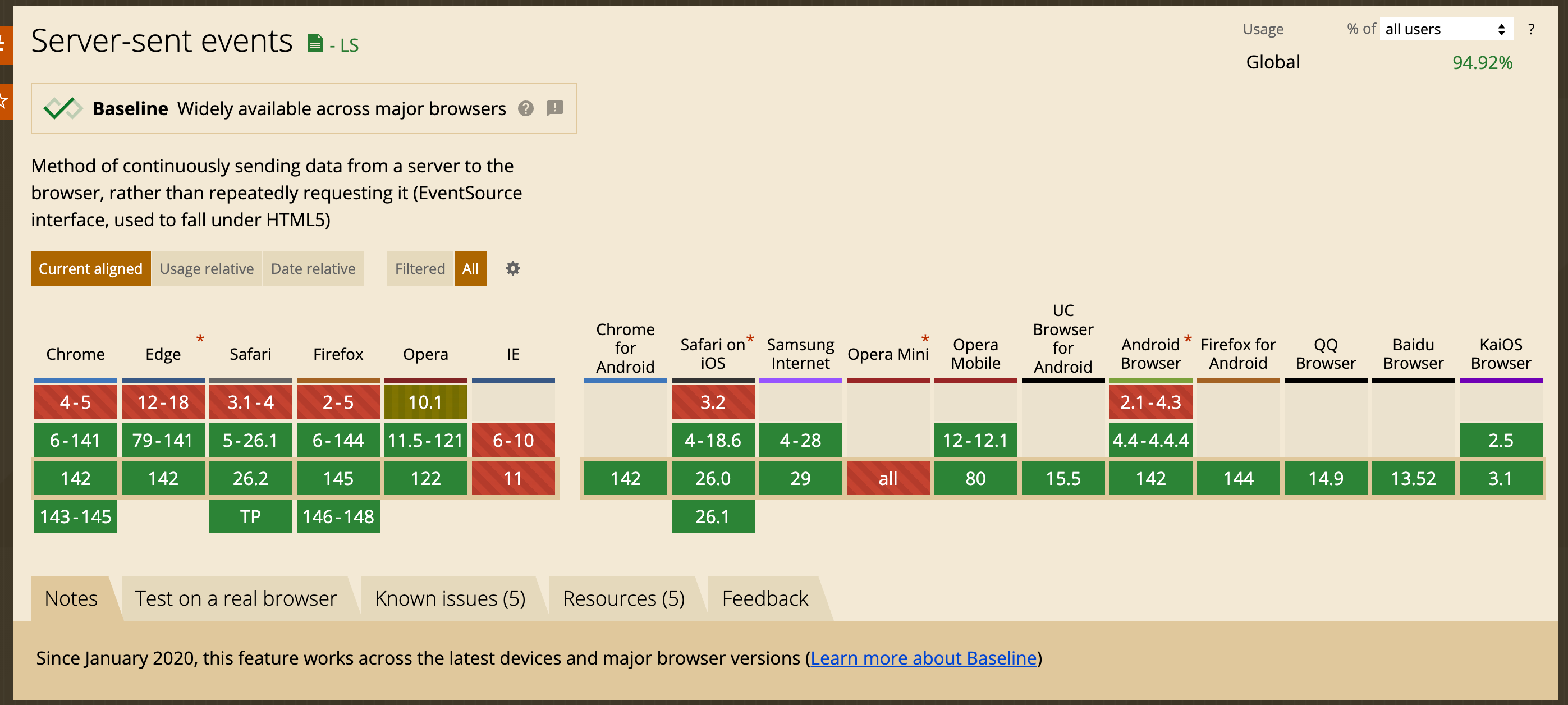
SSE is supported in all modern browsers
How AI APIs Structure Their Streams
OpenAI’s Approach
OpenAI’s Chat Completions API streams chunks in this format:
data: {”choices”: [{”delta”: {”content”: “Hello”}, “index”: 0}]}
data: {”choices”: [{”delta”: {”content”: “ there”}, “index”: 0}]}
data: [DONE]
Key characteristics:
Uses
data:prefix with JSON payloadsThe
deltafield contains incremental content (vs.messagefor complete responses)Terminates with a special
[DONE]sentinel eventToken-level granularity for real-time display
Anthropic’s Claude: A Richer Event Model
Claude’s streaming API introduces a more sophisticated event structure with distinct event types:
event: message_start
data: {”type”: “message_start”, “message”: {”id”: “msg_01...”, “role”: “assistant”, “content”: []}}

event: content_block_start
data: {”type”: “content_block_start”, “index”: 0, “content_block”: {”type”: “text”, “text”: “”}}

event: content_block_delta
data: {”type”: “content_block_delta”, “index”: 0, “delta”: {”type”: “text_delta”, “text”: “Hello”}}

event: content_block_stop
data: {”type”: “content_block_stop”, “index”: 0}

event: message_delta
data: {”type”: “message_delta”, “delta”: {”stop_reason”: “end_turn”}}

event: message_stop
data: {”type”: “message_stop”}

event: ping
data: {”type”: “ping”}
This architecture supports:
Multiple content blocks (text, tool calls, thinking blocks)
Structured lifecycle events (start/delta/stop for each block)
Keep-alive pings to maintain connections
Tool use streaming with fine-grained parameter updates
Extended thinking with dedicated
thinking_deltaevents
How Are Canvas/Artifacts Opened?
Canvas/Artifacts are not separate API calls. They’re part of the same SSE stream with specially typed events that the frontend interprets to trigger UI state changes.Modern AI SDKs use typed data parts within the SSE stream to communicate UI state changes.
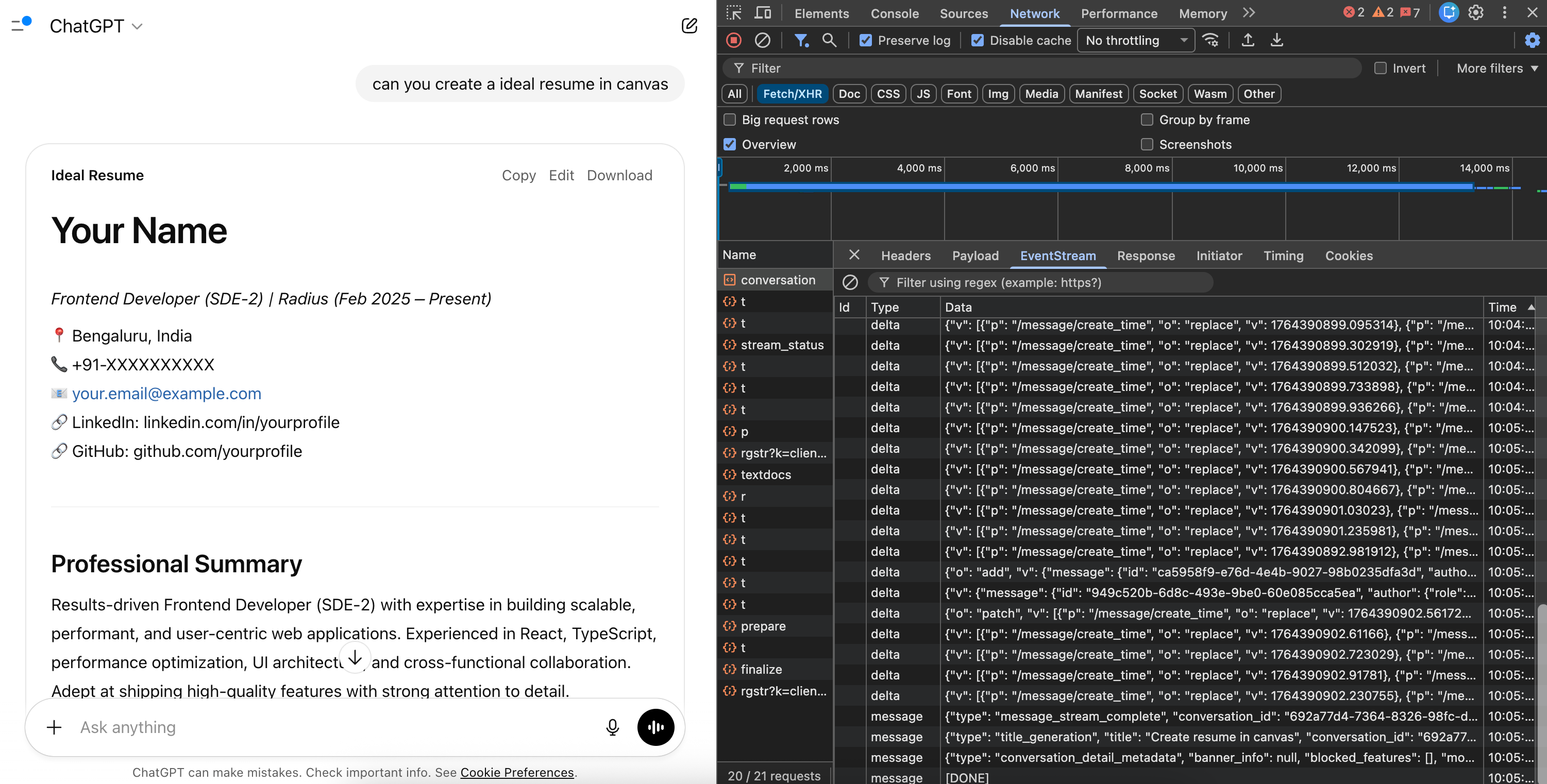
Backend :
// Server-side: Send a custom data part
stream.writeDataPart({
  type: ‘artifact-start’,
  id: ‘artifact-123’,
  kind: ‘code’,
  language: ‘javascript’
});

// Continue streaming the artifact content
stream.writeTextDelta(’function hello() {\n’);
stream.writeTextDelta(’  return “world”;\n’);
stream.writeTextDelta(’}’);

// Signal completion
stream.writeDataPart({
  type: ‘artifact-end’,
  id: ‘artifact-123’
});
Frontend :
// Using Vercel AI SDK as an example
const { messages, data } = useChat({
  api: ‘/api/chat’,
  onData: (dataPart) => {
    if (dataPart.type === ‘artifact-start’) {
      // Open the canvas/artifact panel
      setArtifactPanelOpen(true);
      setCurrentArtifact({
        id: dataPart.id,
        kind: dataPart.kind,
        content: ‘’
      });
    }

    if (dataPart.type === ‘artifact-end’) {
      // Finalize the artifact
      finalizeArtifact(dataPart.id);
    }
  }
});
How Are Images Handled in Streams?
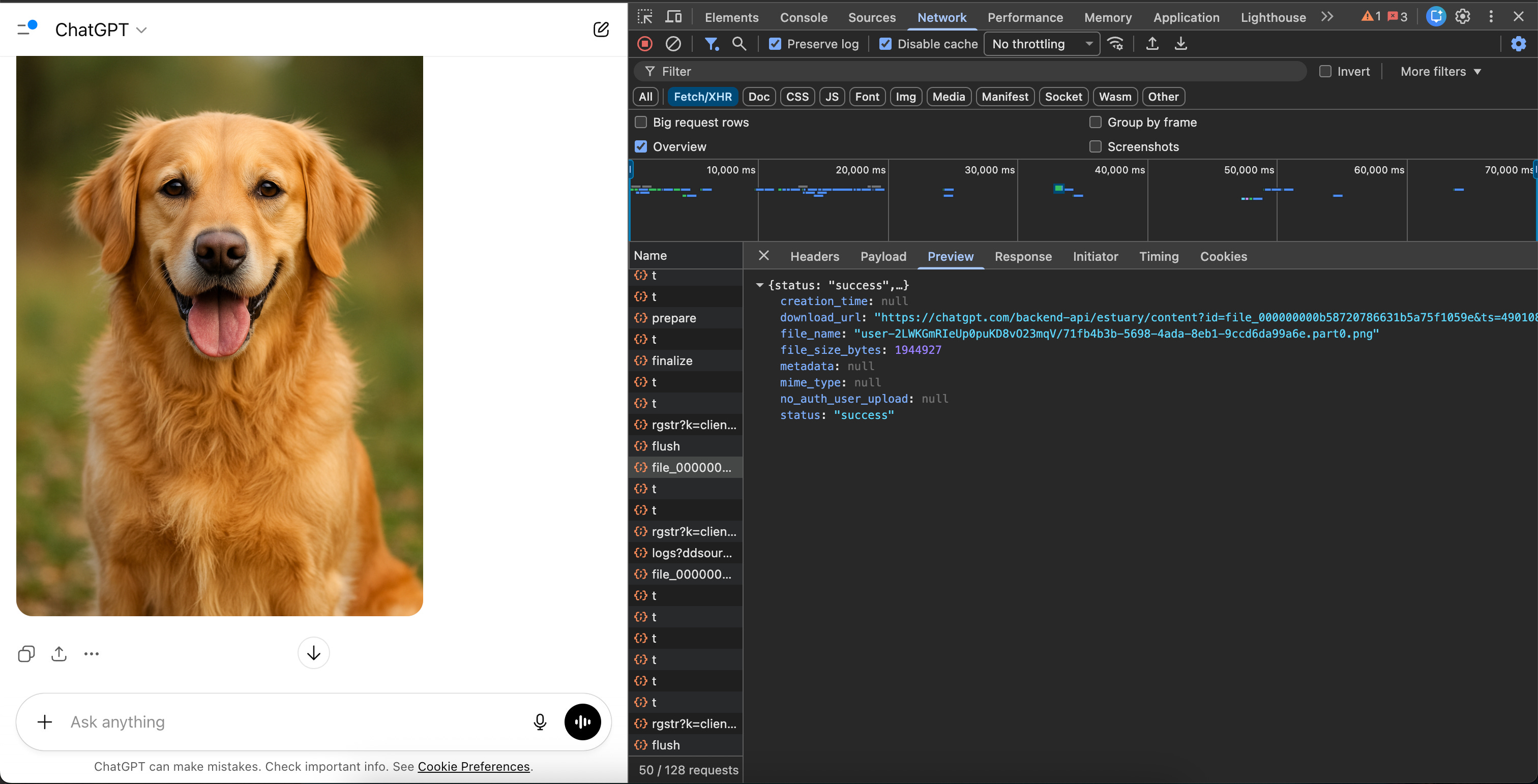
SSE is a text-based protocol—it doesn’t natively support binary data.So AI tools stream a URL reference instead of the binary data like base64. This helps browser also to handle image loading separately.
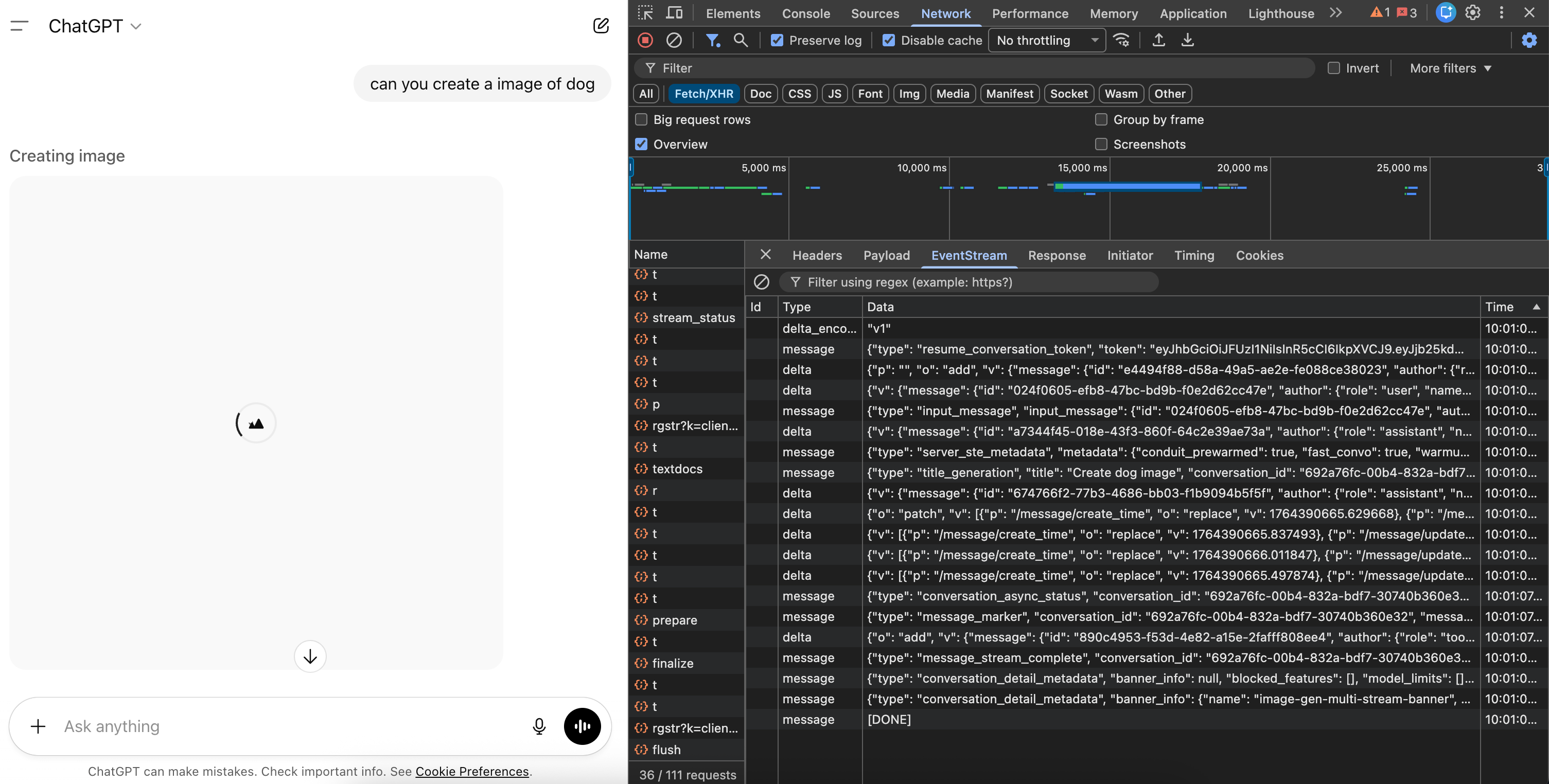
// Server workflow:
// 1. Generate image
// 2. Upload to storage (S3, R2, etc.)
// 3. Generate presigned URL
// 4. Stream the URL

stream.writeDataPart({
  type: ‘generated-image’,
  url: ‘https://storage.example.com/img/abc123?token=xyz’,
  mediaType: ‘image/png’,
  expiresAt: Date.now() + 300000 // 5 minutes
});
// Client
const ImageComponent = ({ url, expiresAt }) => {
  const isExpired = Date.now() > expiresAt;

  if (isExpired) {
    return <div className=”expired-image”>Image expired</div>;
  }

  return <img src={url} alt=”Generated image” />;
};
Implementing SSE Consumption in Your Frontend
The Native EventSource API
For simple use cases:
const eventSource = new EventSource(’/api/chat/stream’);

eventSource.onmessage = (event) => {
  const data = JSON.parse(event.data);
  appendToChat(data.content);
};

eventSource.onerror = (error) => {
  console.error(’SSE error:’, error);
  // EventSource automatically attempts reconnection
};

// Cleanup
eventSource.close();
The Fetch + ReadableStream Approach
For more control (custom headers, POST requests):
async function streamChat(messages: Message[]) {
  const response = await fetch(’/api/chat’, {
    method: ‘POST’,
    headers: { ‘Content-Type’: ‘application/json’ },
    body: JSON.stringify({ messages })
  });

  const reader = response.body
    .pipeThrough(new TextDecoderStream())
    .getReader();

  let buffer = ‘’;

  while (true) {
    const { done, value } = await reader.read();
    if (done) break;

    buffer += value;

    // Parse SSE format
    const lines = buffer.split(’\n\n’);
    buffer = lines.pop() || ‘’; // Keep incomplete event

    for (const line of lines) {
      if (line.startsWith(’data: ‘)) {
        const data = JSON.parse(line.slice(6));
        handleStreamEvent(data);
      }
    }
  }
}
Debugging SSE Streams : Browser DevTools
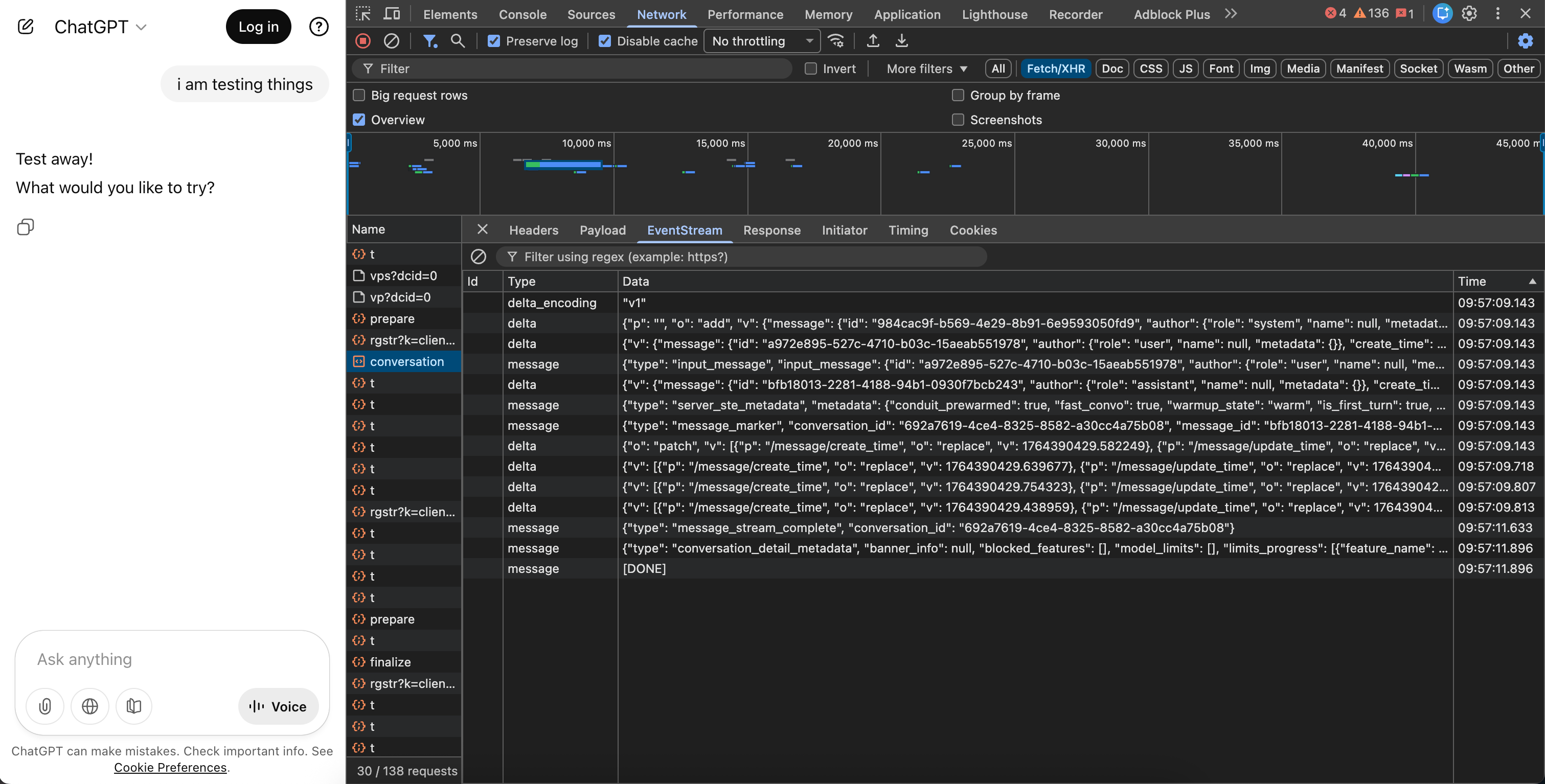
Open Network tab
Filter by “EventStream” or look for your streaming endpoint
Click the request, then the EventStream tab to see events in real-time
Why not Web Sockets?
LLM streaming is fundamentally unidirectional—the server pushes tokens to the client. You send one prompt, then receive a stream of responses. WebSockets’ bidirectional capability is overkill.
SSE offers several advantages too:
Simpler infrastructure: Works over standard HTTP, no special server configuration
Automatic reconnection: Browsers handle disconnects natively
Lower overhead: No handshake protocol or frame parsing
Better debugging: Standard HTTP tools work out of the box
Conclusion
Server-Sent Events might be a decades-old technology, but it’s found its perfect use case in the AI era. The unidirectional nature of LLM streaming—where you send a prompt and receive a cascade of tokens—maps perfectly to SSE’s design philosophy.
Understanding these patterns gives you the foundation to build AI-powered features that feel responsive and polished. Whether you’re integrating an LLM API or building custom streaming experiences, SSE provides the primitives you need