

In my career, I worked on multiple codebases some in Vanilla JS, jQuery, Angular, Php, React in Frontend and Node, Go lang projects in backend. I have started multiple projects and always had a decision point which folder structure to follow. Folder structure decision is very crucial for scaling up and even for Dev experience while searching in Code editors.
Folder Structure is the first thing you see. It tells you how the team thinks about the problem, what they consider important, and how much care went into the codebase. Most teams treat it as a minor setup decision. It is not. It is a communication tool — and like most communication, doing it badly has costs that compound quietly over time.
Table of Contents
What is Folder Structure?
The Two Core Patterns : Layer pattern vs Module pattern
This Applies to Frontend Too
Beyond Layer and Module
Real Codebases Mix These
How to Actually Choose
Why Copying Someone Else’s Structure Fails
Conclusion
References
What is Folder Structure?
Folder structure is how you organise your source code on disk — which files go where, and what groups them together.
The Two Core Patterns
Almost every folder structure I have encountered across these projects comes down to two fundamental approaches.
Layer Pattern
The layer pattern organises code by what it does technically — its role in the stack. Controllers go in a controllers folder. Services go in a services folder. Models go in a models folder.
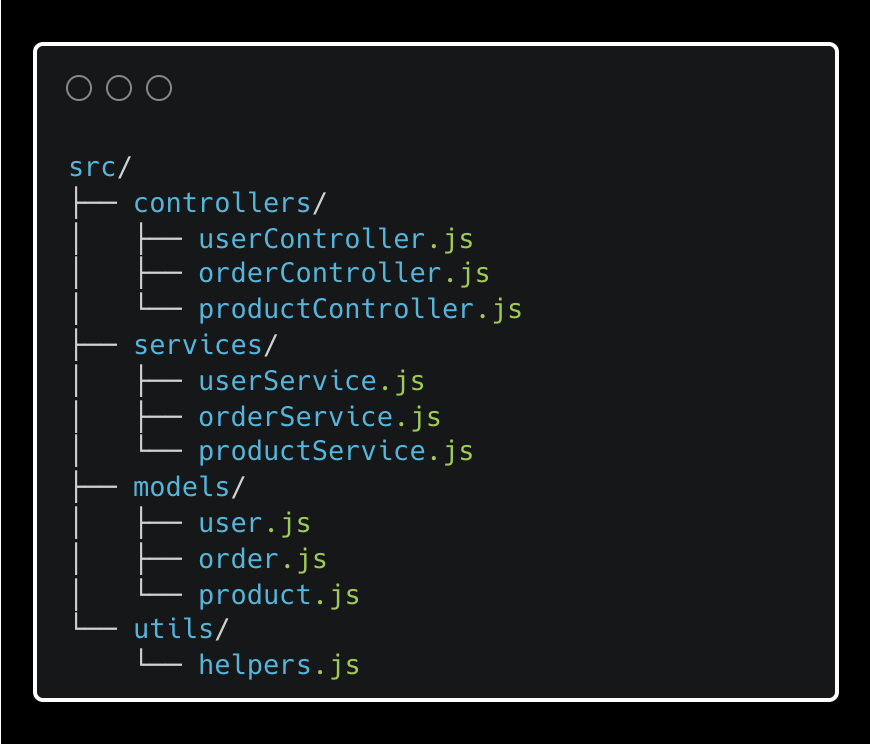
This is usually where everyone starts. It is familiar, low friction to set up, and honestly fine while the project is small. I have set it up this way myself more than once.
The problem shows up as the app grows. Adding a new feature — say, invoices — means touching controllers/, services/, models/, and utils/ all at once. Your changes are scattered across the entire codebase for a single logical addition. Each new entity makes the navigation slightly worse. After five or six features, I have seen developers spend more time figuring out where things are than actually building them.
In a large editor like VS Code with 40 files per folder, Cmd+P becomes your only way to survive.
Real-world example: sahat/hackathon-starter — one of the most starred Node.js boilerplates on GitHub. Classic layer structure with
controllers/,models/,routes/, andviews/at the top level.
Module Pattern
The module pattern organises code by what it is about — its business domain. Everything related to orders lives in an orders folder. Everything related to users lives in a users folder
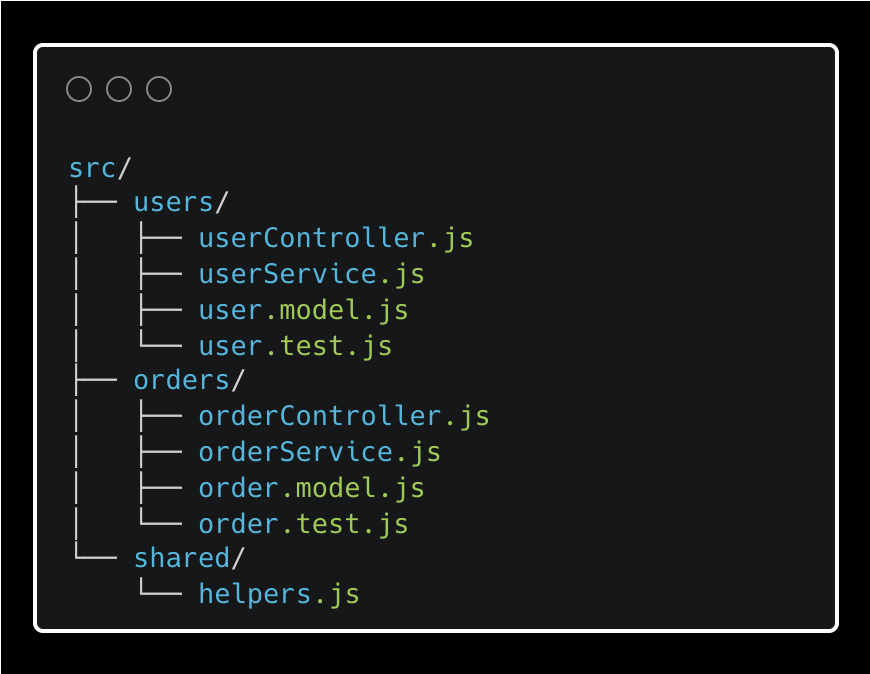
Adding a new feature means adding a new folder. A new developer can find everything related to orders in one place without a treasure hunt. When I onboarded to module-structured codebases, ramp-up time was noticeably shorter — you just open the folder for the feature you are working on and everything you need is there.
A team working on payments/ does not need to understand inventory/. When the folder matches the team boundary, people stop stepping on each other.
Real-world example: NestJS RealWorld example app — a full backend built with NestJS following the module pattern. Each feature (
user/,article/,tag/,profile/) is a self-contained module with its own controller, service, and entity.
Comparison
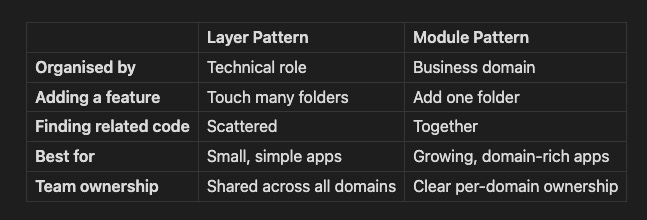
If you are starting a new project today with any expectation of it growing, just start with modules. The “but my domain is still fuzzy” argument is real but overstated — you can always rename a folder. What you cannot easily undo is a layer-structured codebase with forty files per folder and a team of eight all touching the same directories for every feature.
This Applies to Frontend Too
I have felt this pain on both sides. The same split plays out on the frontend, just with different layer names.
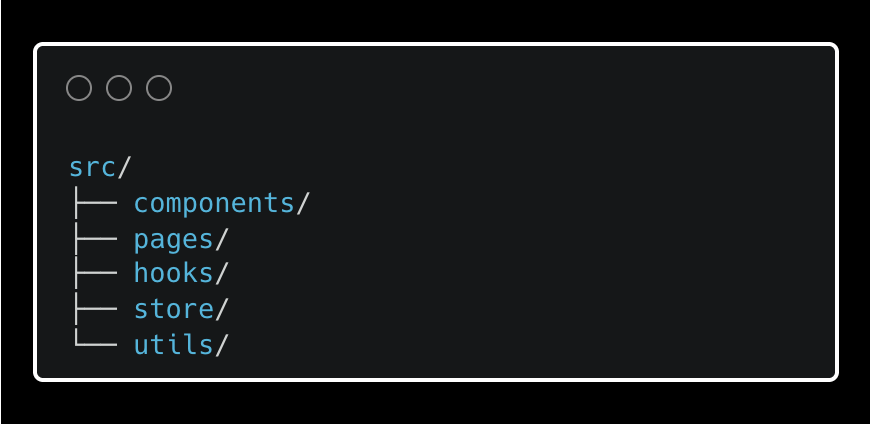
A layer-structured React app
A module-structured React app:
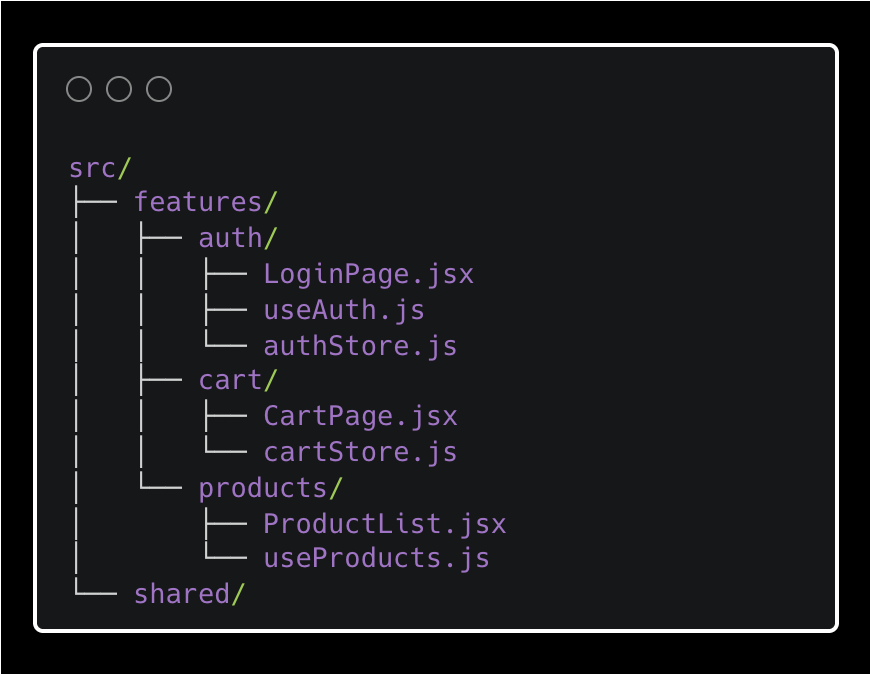
In a large layer-structured React app, adding a new feature means touching components/, hooks/, store/, and pages/ simultaneously. The problem is identical to the backend.
Angular enforces module thinking from day one — the CLI and scaffolding tools push you toward it. React gives you no opinion at all. So, Angular makes it harder to build a structural mess by accident, while React requires someone on the team to actively care.
This is why two React codebases built by different teams can look like they were written in different languages. I have worked in both — the Angular constraint felt limiting at first, but I came to appreciate it the moment I had to navigate someone else’s React codebase with no structure at all.
Beyond Layer and Module
Once teams grow past the basics, a few more patterns show up.
Clean Architecture adds explicit dependency rules on top of the module pattern. The core domain has no knowledge of the database, the framework, or any external service. Infrastructure and delivery mechanisms live at the outer edge.
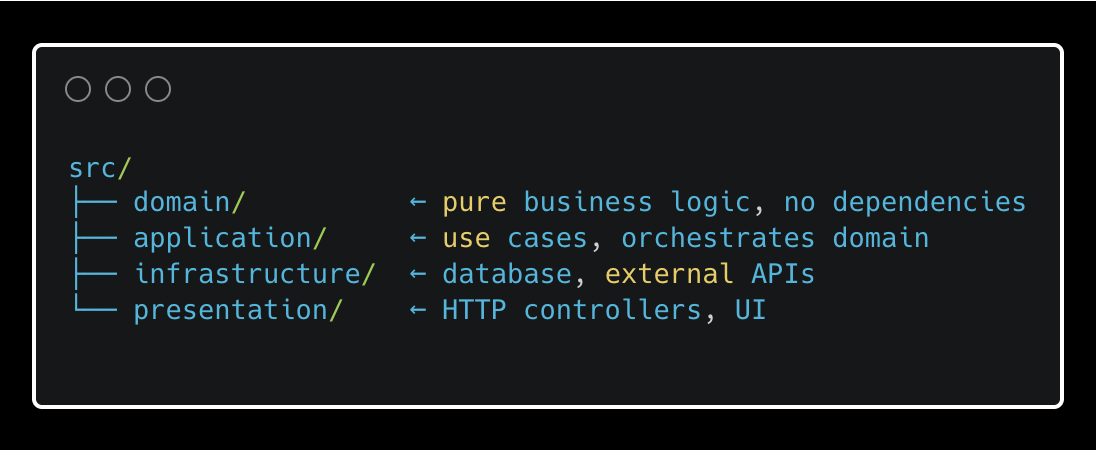
This is the pattern I reach for in Go projects. Go’s opinionated simplicity pairs well with the strict layering — the compiler will tell you if a dependency goes the wrong way.
Vertical Slice Architecture is a different axis entirely — not just more modularity, but a different way of drawing the lines. Where the module pattern groups by domain concept (orders/), vertical slices group by user action (CreateOrder/, CancelOrder/). Each folder is a complete feature from top to bottom.
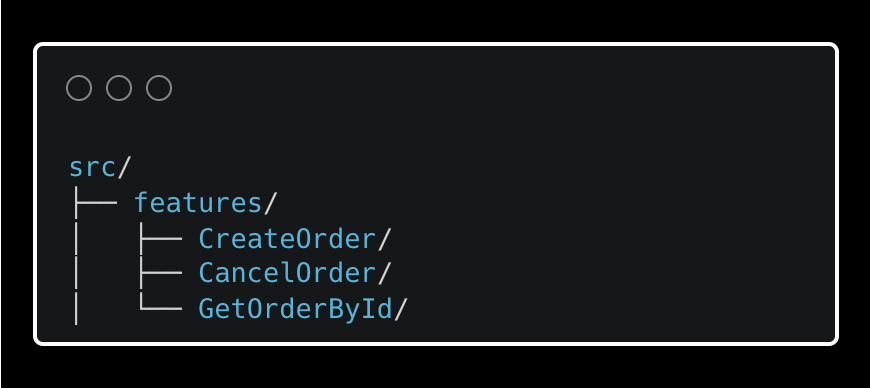
Each slice is self-contained. The trade-off is shared logic: when two slices need the same database query, someone has to decide to extract it. Left unmanaged, you get duplication. Left over-managed, you end up rebuilding the module pattern inside your slice folders anyway.
Screaming Architecture is less a pattern and more a principle, coined by Robert C. Martin. The idea: your folder structure should scream what your application does, not what framework it uses.
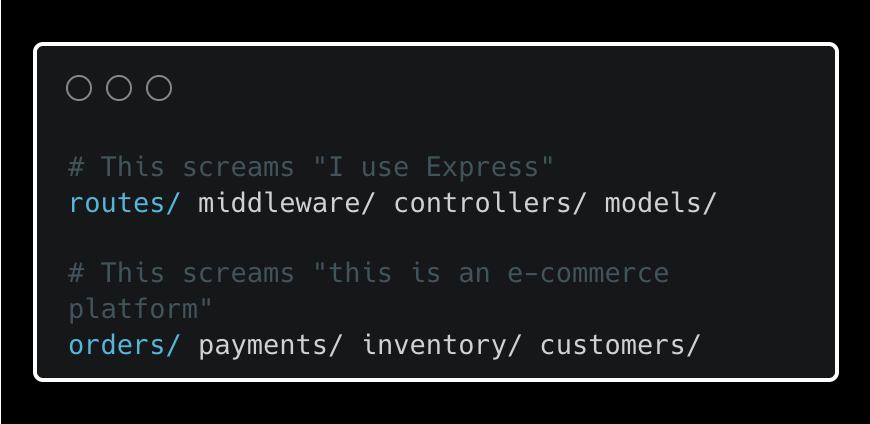
If someone opens your project and the first thing they learn is your framework choice rather than your business domain, the structure is working against you.
Real Codebases Mix These
Production codebases are rarely pure implementations of any single pattern. The most common hybrid I have seen — and used — is modules at the top level with layers within each module.
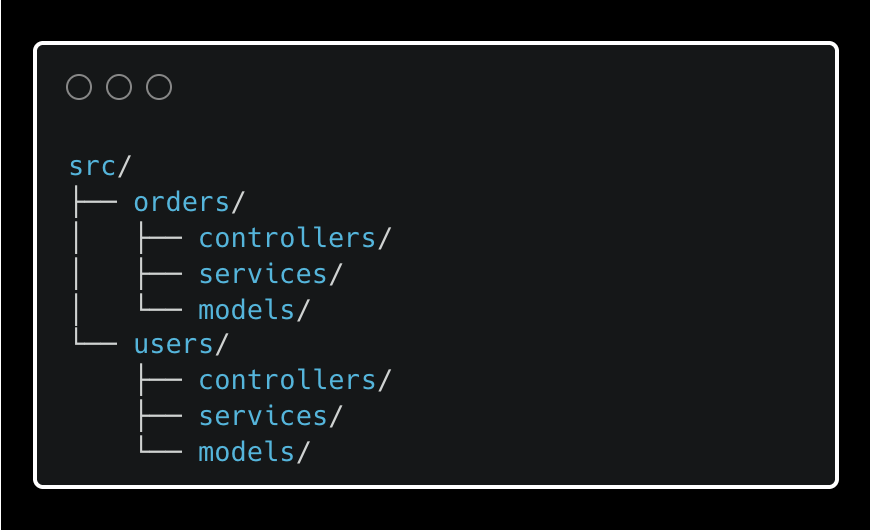
The top level communicates domain ownership. The inner structure keeps technical concerns separate within each domain. If your team is stuck arguing about which pattern to use, this is usually the answer — it gives you both without fully committing to either.
How to Actually Choose
These are the questions I ask before starting a new project or recommending a change on an existing one.
Do you understand your domain yet? If the business concepts are still shifting, module boundaries will keep moving with them. Layers are cheaper to reorganise at this stage. But “our domain isn’t clear yet” can easily become a reason to stay in layers forever — so set a threshold. When the core entities stabilise, plan the migration and account for its cost upfront.
How big is the team, and how fast is it growing? Once you have more than two or three people working across the same codebase regularly, module structures start earning their keep. Shared ownership of layer folders is fine when everyone fits in one room. It gets painful fast when different people are responsible for different parts of the product.
How often are features being added? If the answer is frequently, having related code together adds up fast. Layer structures reward stability. Module structures reward growth.
Why Copying Someone Else’s Structure Fails
This is the trap I have seen teams fall into repeatedly. You find a well-known project, admire how it is organised, and copy the structure wholesale into your own codebase.
It rarely works — because a folder structure is the output of thinking, not a substitute for it.
Take Medusa, the open source commerce framework. Its structure reflects years of contributor decisions, a specific plugin architecture, and constraints that come from being a framework other people build on top of. When you copy that structure into your own internal service, you get the form without the function. The folders feel right until you need to do something that does not fit the shape — and then every addition becomes a negotiation with a structure that was never designed for your problem.
The same goes for tutorials. A tutorial’s folder structure is optimised for a reader following along, not for a team maintaining the codebase for three years. I have seen projects where the entire architecture was shaped by a YouTube tutorial the founding engineer watched in week one. Five engineers and two years later, everyone knew something was wrong but no one could point to exactly when it went sideways.
Conclusion
Folder structure is intention made visible.
Every pattern — layer, module, clean architecture, vertical slice — is someone expressing what they believe matters most about their codebase. The goal is not to find the “correct” one. The goal is to make sure your structure communicates the same thing your team believes about the system.
When those are aligned, a new developer can open the project and understand not just where files are — but why the system is built the way it is. When they are not aligned, you end up with a codebase that tells one story and a team that tells another. That gap is where maintenance gets hard and good engineers quietly start looking for other jobs.
Open source examples
sahat/hackathon-starter — Layer pattern (Node.js)
lujakob/nestjs-realworld-example-app — Module pattern (NestJS)
evrone/go-clean-template — Clean Architecture (Go)
nadirbslmh/go-vertical-slice — Vertical Slice (Go)
ardalis/CleanArchitecture — Vertical Slice / Clean Architecture (.NET)
medusajs/medusa — Screaming Architecture (Node.js)
gothinkster/realworld — Mixed pattern (multiple languages)