
Opera Mini is a game change : Cloud-Based Browsers and Its important to know them.
computation happens elsewhere, optimized results are delivered to the end device.

Index
Introduction
What Are Cloud-Based Browsers?
The Two Faces: Consumer vs. Developer Tools
Performance & Architecture
Use Cases: Then and Now
Why Senior Developers Should Care
Conclusion
Introduction :
Remember Opera Mini in the pre-Jio era? A single webpage that took 30 seconds on Chrome would load in 5 seconds on Opera Mini. The secret wasn’t magic—it was server-side rendering and aggressive compression happening in Opera’s data centers before anything reached your phone.
Fast forward to 2025, and cloud-based browsers have evolved far beyond data savings. They’re now critical infrastructure for web scraping, automated testing, and AI agents that need to interact with websites at scale. What started as a solution for bandwidth-constrained mobile users has become foundational to modern development workflows.
What Are Cloud-Based Browsers?
A cloud-based browser offloads rendering, processing, or execution from the client device to remote servers. The core principle: computation happens elsewhere, optimized results are delivered to the end device.
Think of it like the difference between running Photoshop on your computer versus using Figma in the cloud. The core functionality is the same, but the execution happens elsewhere.


The Two Faces: Consumer vs. Developer Tools
This is where things get interesting. “Cloud-based browser” describes two fundamentally different categories:
Consumer-Facing Browsers
Purpose: Data compression and performance for end users
Examples: Opera Mini, Puffin Browser, Amazon Silk
How they work:
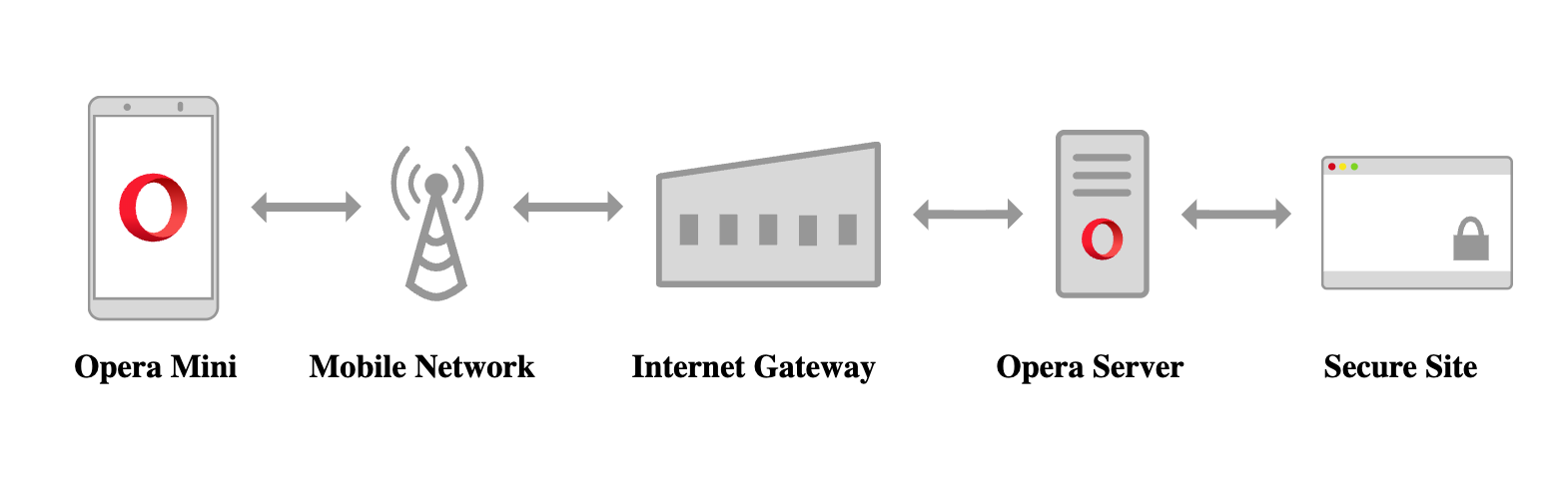
Route traffic through proxy servers
Server-side rendering and compression (Opera Mini rendered pages as OBML format)
Image optimization and transcoding
JavaScript pre-execution to reduce client-side load
Opera Mini’s architecture (simplified):
Developer Tools & Infrastructure
Purpose: Automation, testing, scraping, and orchestration
Examples: Browserless, BrowserStack, Playwright Cloud, Selenium Grid
How they work:
Headless browser instances running in containerized environments
API-driven control over browser behavior
Distributed execution across multiple environments
No UI rendering overhead (for headless mode)
Key distinction: Consumer browsers optimize for users. Developer tools provide browsers as infrastructure.
Use Cases: Then and Now
Pre-AI Era (2010-2020)
1. Emerging Markets Access Opera Mini dominated markets with expensive data (India, Indonesia, Africa). Developers had to account for these browsers when building “mobile-first” sites—which often meant graceful degradation for JS-heavy features.
2. Automated Testing Selenium Grid in the cloud solved the “works on my machine” problem:
BrowserStack/Sauce Labs provided every browser/OS combination
Parallel test execution reduced CI/CD pipeline times from hours to minutes
Real device testing without physical device labs
3. Web Scraping at Scale Before AI hype, companies used headless browsers for:
Price monitoring across e-commerce sites
Competitor analysis
Content aggregation
SEO auditing
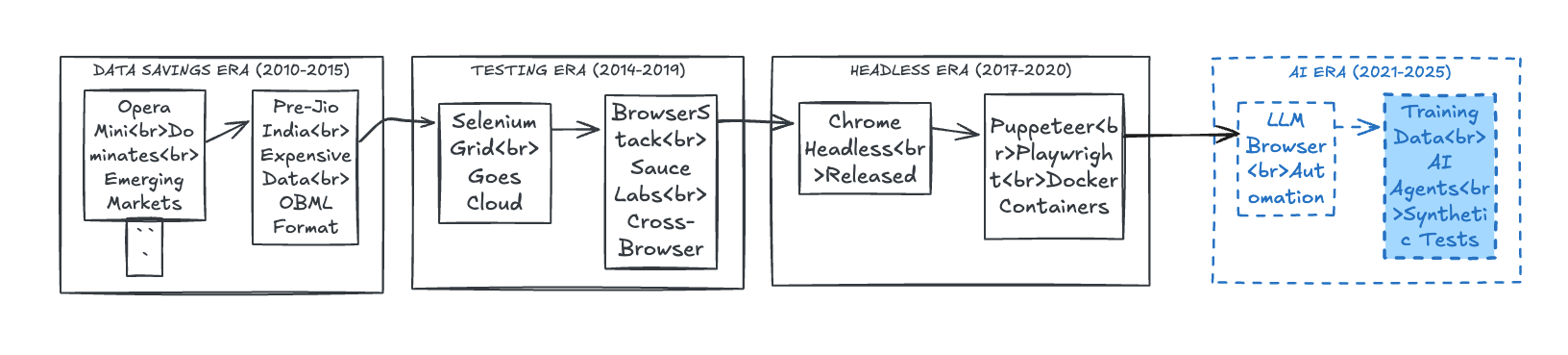
AI Era (2020-Present)
1. AI Agents & Browser Automation LLM-powered agents need programmatic browser access to:
Fill forms, click buttons, navigate sites
Extract structured data from unstructured pages
Execute multi-step workflows
For most teams: cloud headless browsers are cheaper than DIY.
2. Training Data Collection for ML Models
Machine learning models trained on web interactions require massive datasets of browser behavior. Cloud browsers are essential because they provide:
Diverse fingerprints: Rotate user agents, screen resolutions, and browser profiles to avoid detection
JavaScript-rendered content: Capture what users actually see, not just raw HTML
Visual training data: Screenshots and DOM snapshots for vision models learning UI/UX patterns
Behavioral data: Mouse movements, click patterns, scroll behavior for training interaction models
Real-world use case: AI companies training models to understand web interfaces need millions of examples. Cloud browser services like Browserless.io let them:
Spin up 1,000 browser instances
Visit different websites with varied configurations
Capture screenshots, HTML, and interaction data
Process everything in parallel, reducing data collection from weeks to hours
3. Synthetic Monitoring & AI-Powered Testing
Traditional monitoring pings an API endpoint. AI-powered synthetic monitoring actually uses your application like a real user would:
Login flows: AI navigates login pages, fills credentials, handles 2FA
User journeys: Complete checkout processes, form submissions, account creation
Visual regression detection: AI compares screenshots to detect UI breaks
Accessibility testing: AI navigates your site using keyboard-only or screen reader simulation
Performance profiling: Measures real-world user experience across geographies
4. Security & Compliance
Cloud browsers provide:
IP rotation without proxy management
Isolated environments preventing cross-contamination
Compliance with GDPR/data residency requirements (region-specific instances)
5. Performance Baselines
Testing your app through cloud browsers from different regions gives real-world latency data. BrowserStack’s network throttling simulates 3G connections—crucial for global products.
Why Senior Developers Should Care
As a senior developer, understanding cloud-based browsers isn’t just academic—it directly impacts architecture decisions, team velocity, and your infrastructure budget. Here’s why this matters:
1. Architecture Decisions
Global products ≠ local products. If your users are on slow networks (emerging markets, mobile), heavy SPAs kill conversions. Cloud browsers help you test realistic conditions and decide SSR vs. CSR based on data, not assumptions.
2. Cost Analysis
Self-hosted: $1,200/month + setup time + maintenance
Cloud service: $1,000/month, zero setup, instant scaling
Rule of thumb:
<10 devs: Cloud wins
10-50 devs: Hybrid approach
50+ devs: Self-hosted viable
Your time is expensive. If you’re debugging browser infrastructure instead of building features, cloud pays for itself.
3. Security & Compliance
IP rotation: Avoid blocks when scraping/testing
Data residency: Test EU flows from EU servers (GDPR compliance)
Isolation: Fresh containers prevent credential leaks
4. Performance Reality
Your MacBook: 1.2s load
User in Himalayas on 3G: 15-30s load
Cloud browsers test real-world conditions: network throttling, geographic latency, low-end devices. Without this, you’re optimizing blind.
5. Team Velocity
Old way: Safari bug → Dev waits for QA’s Mac → 2 days
New way: CI catches bug → Cloud Safari session → Fixed in 1 hour
Testing speed: 500 tests take 10 minutes (cloud) vs. 100 minutes (self-hosted). 10x faster feedback.
6. Decision Framework
✅ Use cloud browsers:
Global product • Heavy testing • Web scraping • AI agents • No DevOps team
❌ Skip:
Internal tools • <20 tests/day • Can self-host • No cross-browser needs
7. Future-Proofing
Three reasons cloud browsers are becoming critical:
AI agents (ChatGPT, Copilot) all use browser automation—competitors are leveraging this
Privacy regulations require geographic testing you don’t want to build
Web complexity (PWAs, WebAssembly) needs real browser testing
Start small: Use for CI testing → Add monitoring → Experiment with AI → Evaluate ROI in 3 months.
Bottom line: Cloud browsers let small teams test thoroughly, move fast, and build globally without infrastructure overhead. It’s a force multiplier.
Conclusion
Cloud-based browsers have evolved from a bandwidth optimization hack to critical infrastructure. They solve different problems across two domains:
For end users: Data compression and performance on constrained devices (though less relevant in the 4G/5G era).
For developers: Scalable automation, testing, and AI agent infrastructure that would be prohibitively expensive to self-host.
As a senior developer, the key insight is knowing when to leverage them:
Building global products? Test through cloud browsers in target regions.
Running automated workflows? Headless browsers-as-a-service beats infrastructure overhead.
Training AI models on web data? Cloud browsers provide the scale you need.
The Opera Mini era taught us that offloading computation to the cloud can unlock experiences impossible on the client. The AI era is proving that principle applies to machines, not just humans.
Read more :
https://www.meegle.com/en_us/topics/web-browser/web-browsers-for-cloud-based-workflows
https://www.stickypassword.com/blog/what-are-cloud-browsers-and-why-you-should-use-one-3220
https://www.terrificminds.com/blogs/cloud-based-cross-browser-testing-2
Opera Mini’s Technical Architecture - How server-side rendering actually worked
Browserless.io Documentation - Modern headless browser infrastructure
Playwright Cloud Providers Comparison - BrowserStack vs. LambdaTest vs. self-hosted